Image (photo) viewer software is a dedicated software that can display images. These tools can handle many common file formats like PNG, BMP, JPG, etc. With some software, you can rename, cut, copy, delete and convert images from one format to another.
Windows has its own default Image viewing tool to view lots of image formats. But it does lack support for some of the lesser popular image formats.
With the ability to take Images with various gadgets in different formats, windows many times fail to read such different image formats.
If you have such image formats a lot,(which I’m sure many of us do) you can use one of these best free image viewers, to view any type of images on your PC.
Page Contents
3 Best Free Image (Photo) Viewer Software For Windows
I feel this is one software, which still ranks at the top of all the best free image viewers. This is one of the longest-serving and the most popular free image viewer and editor of all times. Irfanview is also packed with many features that others do not have.
IrfanView is a fast and compact image viewer/converter. Simple for beginners and powerful for professionals.
It supports a plethora of image formats, so you can rest assured with this software you can view any image formats in your PC.
After installation, it places two shortcuts on the desktop. One to open the program and the second to view and explore image files (as a file browser) as thumbnails.
IrfanView’s main program’s window is just a plain empty window with a toolbar. But with very powerful functionality, that can be accessed from its menu tools.
The options menu addresses everything from how IrfanView looks, to languages, plugins, and file associations. Talking of Help, IrfanView offers all, any users could ask for, a full manual, FAQs, a list of keyboard shortcuts, and online resources.
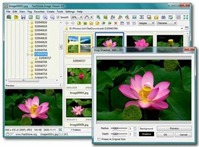
FastStone Image Viewer is another best free image viewer. It has a friendly user interface with a nice array of features like Image viewing, management, comparison, red-eye removal, emailing, resizing, cropping, retouching, and color adjustments.
The program’s innovative full-screen mode provides quick access to EXIF information, thumbnail browsing, and other functionalities. Its toolbar is hidden in full-screen mode but pops up when your mouse touches the edges of the screen.
Another notable feature of this software includes a high-quality magnifier and a musical slide show. With 150+ transitional effects, drop shadow effects, and much more.
The program’s default design is quite nice but if you want to, you can customize it to your liking with several skins.
Other features of this program, includes resizing, cropping, remove re-eye, adjust color, brightness, and contrast, etc. It also includes simple effects like filters, including Lens, waves, Morphs, multiple folder slide shows, batch cropping, etc.
The FastStone Image viewer can batch convert files into several popular image formats including GIF, BMP, PSD, and PNG. The slide show creator allows you to apply the transition effect between images and you can add your own MP3 as a soundtrack.
Remember its basically a FREE image viewer and not a full-fledged Image editing tool.
Google’s free desktop photo management application. Like all other Google products, this is another versatile program. Picasa is a software that helps you instantly find, edit, and share all the pictures on your PC.
The beauty of this program is, every time you open Picasa, it automatically locates all your pictures on your computer, even the ones you may have forgotten.
The program sorts all your pictures into a visual album, organizing all your pictures by date and folder names. Which makes it easier to find and locate your picture on the hard drive.
You can also drag and drop to arrange your albums and also make labels to create new groups.
The software also has some simple editing tools like cropping (standard and custom) removal of red-eye, enhancing color, color to black and white.
Create slide shows, add MP3 as background music. E-mail photos with Picasa’s built-in client. You can also make instant backups to CD or other hard drives of your photo collections.
This program has many other tools and features you got to use it to know all its features.
Hello! I am Ben Jamir, Founder, and Author of this blog Tipsnfreeware. I blog about computer tips & tricks, share tested free Software’s, Networking, WordPress tips, SEO tips. If you like my post /Tips then please like and share it with your friends.
We use cookies on our website to give you the most relevant experience by remembering your preferences and repeat visits. By clicking “Accept”, you consent to the use of ALL the cookies.
This website uses cookies to improve your experience while you navigate through the website. Out of these cookies, the cookies that are categorized as necessary are stored on your browser as they are as essential for the working of basic functionalities of the website. We also use third-party cookies that help us analyze and understand how you use this website. These cookies will be stored in your browser only with your consent. You also have the option to opt-out of these cookies. But opting out of some of these cookies may have an effect on your browsing experience.
Necessary cookies are absolutely essential for the website to function properly. This category only includes cookies that ensures basic functionalities and security features of the website. These cookies do not store any personal information.