Extra copies of files or images (duplicate files) can use up space very fast on your computer hard disk. We show you a quick and easy solution to find and delete duplicate files in Windows easily and safely from your system.
You may have thousands of photos, videos, mp3 music files, or documents. It’s quite natural that you have lost track of it.
One fine day you find you are running out of disk space on your PC, but sorting through thousand of your files is a daunting task there are just too many of them.
That’s why you need to use a standalone tool to find and delete duplicate files with just a few clicks.
Find and delete duplicate files
Duplicate Cleaner is software that will help you locate and remove useless file duplicates to free up disk space and better organize your file collections.
You will have full control in being able to look through the list of duplicates and decide which copy to keep.
Duplicate file finders are tools that do this job effortlessly. These tools scan and present you with a list of duplicate files (any type of files). Which you can selectively safely delete from your computer.
How would you know how many duplicate files of the same song you have? Looking for such duplicate files manually and deleting them will be the next to impossible task.
DUPLICATE CLEANER is such a utility that can find and delete duplicate files, for you. Help you to safely find and delete duplicate files, saving space and simplifying your life.
Tremendous help in cleaning the useless clutter from your hard disk. Duplicate Cleaner is a tool to assist you in up the contents from your hard drive or network.
How to use Duplicate cleaner
When you run this software you will be surprised to see, just how many duplicate files it detects. Like Photos, Music, word documents, PowerPoint presentations, videos – you name it if it’s there then Duplicate Cleaner will find it for you.
A must-have software, to clean up your PC regain hard disk space by finding and deleting duplicate files. The interface of the program may not be very easy for the very novice to understand.
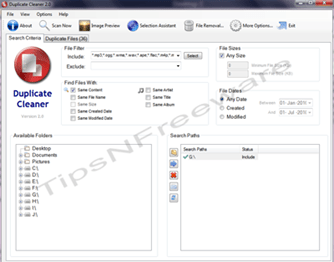
But it is fairly straightforward. You can select a whole partition or even a single folder to scan and find and delete duplicate files. The program gives you three basic options for searching: ::: Folder (s), ::: File types, and ::: filter criteria. You can scan a whole partition, for example, your music collection partition to find any duplicate copies of your music collection.
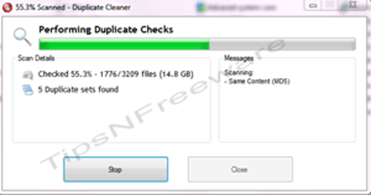
The program will find it and display neatly in which folder’s the duplicate files are. So that you can selectively delete the files.
Additionally, you can also search for files by the same name, same date, or even by file size. Once the program returns a list of results, you then have to decide what to do with the dupes.
The program allows you to tick the boxes of the items you want to modify and perform an action- delete or delete to recycle bin.
Duplicate Cleaner can also clean up orphaned files and empty folders if you desire.
CAUTION: The Application offers a few safety measures which are accessible from an options file menu. Items such as Protect C:\Windows and C:\Program files etc. but these are selected by default.
But such files may still show up in the duplicate list. But the tool warns you if you try to delete such files. This I feel is one Cons that goes against this otherwise excellent optimization tool for intermediate to advanced users.
Here are some key features of Duplicate Cleaner
::: Find and delete Duplicate Files by content, fast! ::: Cleaner hard drives mean faster performance ::: Fast Scanning and accurate duplicate comparison (Uses the MD5 Hash algorithm) ::: Deep scans music – locate duplicate music formats (includes MP3, iTunes (M4A), and more.) ::: Flexible search parameters ::: Intelligent Selection Assistant ::: Search home or networked drives ::: Search for multiple locations ::: Export / Import results in CSV format ::: View Path, Size, and Date of files ::: Large, resizable list window ::: Image preview window (helpful to delete duplicate images) ::: Delete duplicate files to the Recycle bin ::: Move dupe files to a new location ::: Turn duplicate files into hard links (NTFS file systems only) ::: Protection for Windows and system files ::: Supports multiple languages
Hello! I am Ben Jamir, Founder, and Author of this blog Tipsnfreeware. I blog about computer tips & tricks, share tested free Software’s, Networking, WordPress tips, SEO tips. If you like my post /Tips then please like and share it with your friends.
We use cookies on our website to give you the most relevant experience by remembering your preferences and repeat visits. By clicking “Accept”, you consent to the use of ALL the cookies.
This website uses cookies to improve your experience while you navigate through the website. Out of these cookies, the cookies that are categorized as necessary are stored on your browser as they are as essential for the working of basic functionalities of the website. We also use third-party cookies that help us analyze and understand how you use this website. These cookies will be stored in your browser only with your consent. You also have the option to opt-out of these cookies. But opting out of some of these cookies may have an effect on your browsing experience.
Necessary cookies are absolutely essential for the website to function properly. This category only includes cookies that ensures basic functionalities and security features of the website. These cookies do not store any personal information.