Too many startup programs can prolong windows boot time and affect your PC’s performance. Here’s how to prevent programs from automatically starting when you turn on your computer.
Whenever you install software in your PC, some of them (software) can set to start up automatically when you turn on your PC, whether you need them or not.
For example programs like Adobe Acrobat, iTunes, Spotify, and iCloud set themselves up to start when you turn on your PC.
Is that a problem with programs starting automatically?
Programs starting automatically unnecessarily take up memory and system resources, slowing your PCs booting time and potentially hampering your PC’s performance.
The more programs that launch at startup, the greater your PC’s performance is affected. But there are certain types of programs that you do want to start automatically, such as your antivirus, firewall programs, etc. However, many apps make themselves set to start automatically when windows start with little or no reason.
Did it ever occur to you, why windows take an eternity to boot up?
Even if you have a reasonably powerful system, many times it’s the unwanted programs that launch every time you start your computer. Worst of all is when numerous unneeded and invisible processes get launched.
This slows down both the start-up and the performance of your computer as a whole. If you feel your system is powerful enough and free from viruses and Malware’s and yet your system is not performing up to the mark?
Think of unwanted programs starting automatically in the background taking up all your system resources.
How to prevent and disable Windows startup program
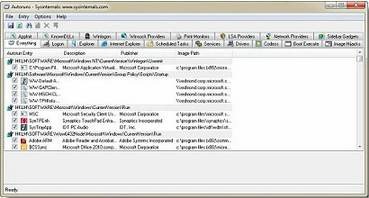
AUTORUNS is a FREE utility, that manages windows startup programs, shows you what programs are configured to run during system boot.
Autoruns is a pretty advanced tool from Microsoft designed to give you lots of information about everything that happens on your computer like running processes, services, startup entries, Winsock providers, etc.
It’s a very useful program for both novice and advanced users. You can easily find out what’s eating up your system resources or if there is any hidden malware inside your computer.
A tool to easily manageWindows startup programs. View the drivers, applications, and even viruses. Remember once a program is listed to run on start-up folder, it will start when windows boot and will run in the background taking up your precious system resources.
When we install a program/software many of them get configured to run on windows startup without your knowledge. Most of these we don’t really need.
AUTORUNS is very small and a Free tool to Manage windows startup programs. Making windows to boot fast.
The program’s interface is a little cluttered, with 17 tabs that display the various programs and processes that run on startup.
The program is structured into tabs with access to different sections: Logon, Explorer, Internet Explorer, Scheduled Tasks, Services, Drivers, Codecs, Boot Execute, Image Hijacks, Applnit, KnownDLLs, Winlogon, Winsock Providers, Print Monitors, LSA Providers, Network Providers, and sidebar gadgets.
Disabling an unwanted process is as simple as unchecking the box next to it.
Autoruns lets users optionally hide windows entries or windows and Microsoft entries. This feature is helpful to prevent users from accidentally disabling critical windows processes.
Manage Windows startup programs, with this free software and make windows boot up faster and run faster.
AutoRuns comes as a ZIP file and is accessible after extraction with no need for installation.
TYPE: Free Size : Less than 2 MB Operating system: Windows XP/Vista/7/8.1/10
Hello! I am Ben Jamir, Founder, and Author of this blog Tipsnfreeware. I blog about computer tips & tricks, share tested free Software’s, Networking, WordPress tips, SEO tips. If you like my post /Tips then please like and share it with your friends.
We use cookies on our website to give you the most relevant experience by remembering your preferences and repeat visits. By clicking “Accept”, you consent to the use of ALL the cookies.
This website uses cookies to improve your experience while you navigate through the website. Out of these cookies, the cookies that are categorized as necessary are stored on your browser as they are as essential for the working of basic functionalities of the website. We also use third-party cookies that help us analyze and understand how you use this website. These cookies will be stored in your browser only with your consent. You also have the option to opt-out of these cookies. But opting out of some of these cookies may have an effect on your browsing experience.
Necessary cookies are absolutely essential for the website to function properly. This category only includes cookies that ensures basic functionalities and security features of the website. These cookies do not store any personal information.