How to limit the number of posts shown under a labels page in a blogger blog.
Depending on the number of posts, your Label list will grow. As you are at liberty to put as many Labels as you can think of for a particular post.
It’s said you can have as many as 500 labels for a single post (but I think nobody has so far reached that figure yet).
If you have been Labeling your blog posts correctly with few labels, then it’s not a problem as long as the number of posts is not very high.
But as your blog grows and you start writing more and more articles, your labels list will grow and grow and ultimately fill up your sidebar.
If you have been following the golden rule of Labeling your Blog post under two categories are Major and Minor categories, then you are well off and probably you know already what this post is all about.
But even then, if you are using Labels as tabs either on the Navigation bar or in the sidebar. And if you click on that particular Label, all the posts under that particular Label will be shown.
Suppose you have 30 or 40 posts under that Label, imagine how long it will take to load all those pages? that is something no blogger not even you want that.
There’s got to be a way to limit the number of posts to be shown under a Label page.
In Blogger it’s quite easy to limit the number of posts to be displayed per page, but how to limit the number of posts on a Label Page?
In this article, I will show you how you can limit the number of Posts on a Label Page.
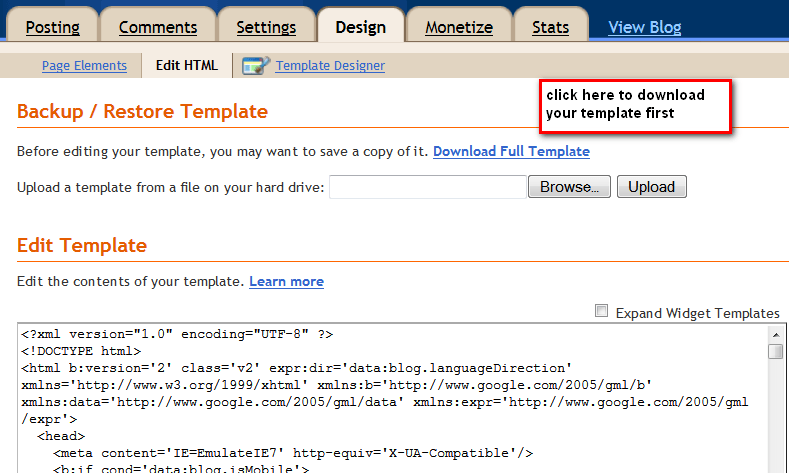
First Log on to your Blogger account, then go to Dashboard > then to Design > Edit HTML
Before you proceed further please Back up your existing Template to be on the safer side, just in case something goes wrong you can always revert back
Next on the Edit HTML window on the top right corner check the box “Expand Widget”. Now find the following code in your Template.
Press CTRL+F on your keyboard a small search box will be displayed on your extreme top right corner of the window.
Copy-paste the following code there, the code will be highlighted (as shown below) on your template if found.
expr:href=’data:label.url’
Depending on your Template you may find this code in more than one instance. Replace them with the following code:
expr:href=’data:label.url + “?max-results=5” ‘
If you are using Menu Tabs which links to your Label pages, then the Label Links you are using probably looks like this :
[http://YOUR BLOG NAME.blogspot.com/search/label/YOUR LABEL NAME ]
To limit the number of posts shown under a particular Label, we just need to add the following to the link ?max-results=5. So your Label Link should be like this
[ http://YOUR BLOG NAME.blogspot.com/search/label/YOUR LABEL NAME?max-results=5 ]
Here the max-result=5 means to show only 5 posts at a time under that particular label link. You can change it to any number you want and then save it then save your template.
I would suggest not to increase the max-results to more than 5 or 6, because the more is the number, the longer it will take to load the pages.
One more thing to remember is that the LABEL menu is case-sensitive, so you must put it as it appears. otherwise, it won’t work.
Labeling and Categorizing your Blog posts are very important. It not only helps your readers to navigate through your blog but also for the search engines.
Hello! I am Ben Jamir, Founder, and Author of this blog Tipsnfreeware. I blog about computer tips & tricks, share tested free Software’s, Networking, WordPress tips, SEO tips. If you like my post /Tips then please like and share it with your friends.
8 thoughts on “How To Limit the Number of Posts shown in Labels Page”
I have added related posted like you added and increased number of posts. Now its showing me 20 related posts per page.
I saw in my label page, i can also see 20 post per label then i have added “expr:href=’data:label.url + “?max-results=5″ as you mentioned in the above post.
Now, if i open any label, i can see 50 results, but in the related post, it is still showing 20 related post.
I need your help. I spent more than one day but dint do anything… Help me.
Hello Rahul !! Have you properly categorized your posts ? as explained in this POST. Besides in your blogger dashboard you need to specify how many posts to be displayed per page. Hope it helps. It worked fine with me, when I had my blog at blogspot.
Please check my site, I have used the code but nothing happened. I have done in dashboard as well.
Well RAHUL, there seems to be a little confusion here. I have checked your site, it seem to be working quite well, all your menus, and sub menus are working perfect. What I observed is the related posts which are a bit too many 15 I counted, if that’s what you mean than I guess, you followed the wrong article. It seems you are site is on Blooger, if so read this POST for the best related widget, or if you are on Word press platform than read this POST for the best WP related post plugin. Hope this should work for you. By the way with these widget/plugin you can specify how many related post to be displayed at the end of your Post.
My main page does has a maximum of 8 post, but then when I reach page two i only shows 4 post. How do I set it also to 8? Also having problems implementing this. I replaced it but still no changes to the number of post per label
Hello Kramer, depending upon the number of posts you have under that particular label, only those will be shown.
hey bro kindly help me out i unable to show ur post on one page only showing 2 or 3 post shoowing per page kindly chk my blog and help me i used every trick and also changed the templates but nothing happened plz help help help
Hello Rehan ! sorry but I could not understand what you are asking for. Visited your site. If you are asking to increase the number of posts to be shown in the first page, that you can do from your blogger dashboard and from there choose how many posts you would like to show per page. well thats what I guessed from your question.Hope i’m not wrong.
Comments are closed.
We use cookies on our website to give you the most relevant experience by remembering your preferences and repeat visits. By clicking “Accept”, you consent to the use of ALL the cookies.
This website uses cookies to improve your experience while you navigate through the website. Out of these cookies, the cookies that are categorized as necessary are stored on your browser as they are as essential for the working of basic functionalities of the website. We also use third-party cookies that help us analyze and understand how you use this website. These cookies will be stored in your browser only with your consent. You also have the option to opt-out of these cookies. But opting out of some of these cookies may have an effect on your browsing experience.
Necessary cookies are absolutely essential for the website to function properly. This category only includes cookies that ensures basic functionalities and security features of the website. These cookies do not store any personal information.









I have added related posted like you added and increased number of posts. Now its showing me 20 related posts per page.
I saw in my label page, i can also see 20 post per label then i have added “expr:href=’data:label.url + “?max-results=5″ as you mentioned in the above post.
Now, if i open any label, i can see 50 results, but in the related post, it is still showing 20 related post.
I need your help. I spent more than one day but dint do anything… Help me.
Hello Rahul !! Have you properly categorized your posts ? as explained in this POST. Besides in your blogger dashboard you need to specify how many posts to be displayed per page. Hope it helps. It worked fine with me, when I had my blog at blogspot.
Please check my site, I have used the code but nothing happened. I have done in dashboard as well.
Well RAHUL, there seems to be a little confusion here. I have checked your site, it seem to be working quite well, all your menus, and sub menus are working perfect. What I observed is the related posts which are a bit too many 15 I counted, if that’s what you mean than I guess, you followed the wrong article. It seems you are site is on Blooger, if so read this POST for the best related widget, or if you are on Word press platform than read this POST for the best WP related post plugin. Hope this should work for you.
By the way with these widget/plugin you can specify how many related post to be displayed at the end of your Post.
My main page does has a maximum of 8 post, but then when I reach page two i only shows 4 post. How do I set it also to 8? Also having problems implementing this. I replaced it but still no changes to the number of post per label
Hello Kramer, depending upon the number of posts you have under that particular label, only those will be shown.
hey bro kindly help me out
i unable to show ur post on one page only showing 2 or 3 post shoowing per page kindly chk my blog and help me
i used every trick and also changed the templates but nothing happened
plz help help help
Hello Rehan ! sorry but I could not understand what you are asking for. Visited your site. If you are asking to increase the number of posts to be shown in the first page, that you can do from your blogger dashboard and from there choose how many posts you would like to show per page.
well thats what I guessed from your question.Hope i’m not wrong.