A free tool to Normalize MP3 files Volume level, so all music plays at the same volume. Are you tired of reaching for the volume Knob every time your mp3 player changes to a new song?
If you listen to MP3 files on your computer, iPod, or MP3/media player, there’s a good chance that you may have observed some MP3 music files that were really quiet while others were really loud? It can be quite an annoying problem and here’s how to fix it.
MP3 Gain
MP3 gain is a MP3 file normalizer, free software that analyses and adjusts the volume of MP3 files so that they have the same volume. You may have observed some files have a normal sound level , some files too loud, and some mp3 files volumes too low.
You need to use a MP3 file normalizer to normalize MP3 files volume. So they play at the same volume level. MP3 gain is a FREE MP3 file volume normalizer, which analyses and adjusts the MP3 volume. So that they all have the same consistent volume! cool !
MP3Gain is a free utility that analyzes mp3 files and determines how they will sound to the human ear. It will then adjust the files so they have about the same loudness, without affecting the quality of the recording. You can use it in two ways, which are Track or Album Mode.
Track mode corrects the mix of unrelated songs to the level you select. While Album Mode corrects the entire album by relating them to the other songs on the album.
The best thing about this tool is, its quite fast, and it doesn’t just do peak normalization as most normalizer software does. But instead, the tool does a statistical analysis of the file to determine how loud the file actually sounds to the human ear. This is one of the best MP3 file normalizer, a totally Freeware.
The changes this tool does to your MP3 files are lossless. Which means there is no loss of quality. Because the program adjusts the mp3 files directly, without any decoding or re-encoding, so the quality of your MP3 files is not affected.
HOW TO USE MP3 GAIN:
After installing, open the program. The interface is very simple and easy to understand. You can analyze and normalize a single file or multiple files or even a folder with your MP3 files.
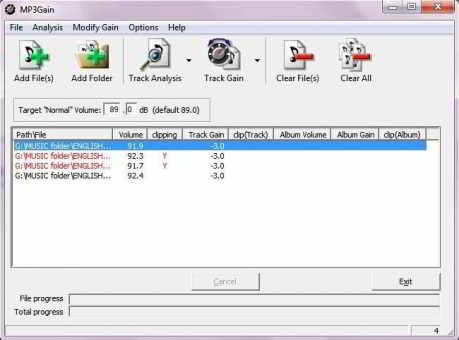
Load the MP3 files, click on the analyze button in the programs menu. The tool analyses all your mp3 files and displays the volume level in decibels of all the MP3 files
The default Target “normal” Volume is set to 89.0 dB. If some of the files have higher dB than it will show in RED color as shown above. Some of the MP3 files have more than 92dB, which may cause sound distortion (clipping).
MP3Gain does not just do peak normalization, as many normalizers do. Instead, it does some statistical analysis to determine how loud the file actually sounds to the human ear.
Also, the changes MP3Gain makes are completely lossless. There is no quality lost in the change because the program adjusts the mp3 file directly, without decoding and re-encoding.
You can choose the default level of dB for each mp3 file and apply it. The tool instantly analyses and adjusts the volume of each MP3 file and saves it.
That’s it, as simple as that. Enjoy your Music, with this FREE MP3 file normalizer, normalize MP3 files volume.
Download the latest version of MP3 Gain for WINDOWSforMac OS X
Did you like this post? How do you normalize your collection of MP3 songs?
Hello! I am Ben Jamir, Founder, and Author of this blog Tipsnfreeware. I blog about computer tips & tricks, share tested free Software’s, Networking, WordPress tips, SEO tips. If you like my post /Tips then please like and share it with your friends.
4 thoughts on “How to Normalize MP3 Files to Play at the Same Volume”
wonderful information, I had come to know about your blog from my friend nandu , hyderabad,i have read atleast 7 posts of yours by now, and let me tell you, your website gives the best and the most interesting information. This is just the kind of information that i had been looking for, i’m already your rss reader now and i would regularly watch out for the new posts, once again hats off to you! Thanks a ton once again, Regards
Hai ANIRUDH !! I’m glad that this simple Blog was helpful to you and thank you for your comment.You bet you can expect more useful staff for the Home users.
Do you mind if I quote a few of your articles as long as I provide credit and sources back to your blog? My website is in the very same area of interest as yours and my visitors would truly benefit from a lot of the information you present here. Please let me know if this alright with you. Thank you!|
Also visit my homepage pit d 2013 formularz (Mathieu.ro)
Thanks Mathieu !! for the comment.Your request accepted. happy blogging
Comments are closed.
We use cookies on our website to give you the most relevant experience by remembering your preferences and repeat visits. By clicking “Accept”, you consent to the use of ALL the cookies.
This website uses cookies to improve your experience while you navigate through the website. Out of these cookies, the cookies that are categorized as necessary are stored on your browser as they are as essential for the working of basic functionalities of the website. We also use third-party cookies that help us analyze and understand how you use this website. These cookies will be stored in your browser only with your consent. You also have the option to opt-out of these cookies. But opting out of some of these cookies may have an effect on your browsing experience.
Necessary cookies are absolutely essential for the website to function properly. This category only includes cookies that ensures basic functionalities and security features of the website. These cookies do not store any personal information.















wonderful information, I had come to know about your blog from my friend nandu , hyderabad,i have read atleast 7 posts of yours by now, and let me tell you, your website gives the best and the most interesting information. This is just the kind of information that i had been looking for, i’m already your rss reader now and i would regularly watch out for the new posts, once again hats off to you! Thanks a ton once again, Regards
Hai ANIRUDH !! I’m glad that this simple Blog was helpful to you and thank you for your comment.You bet you can expect more useful staff for the Home users.
Do you mind if I quote a few of your articles as long as I provide credit and sources back to your blog?
My website is in the very same area of interest as yours and
my visitors would truly benefit from a lot of the information you present
here. Please let me know if this alright with you. Thank you!|
Also visit my homepage pit d 2013 formularz (Mathieu.ro)
Thanks Mathieu !! for the comment.Your request accepted. happy blogging