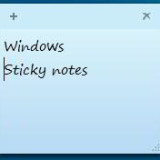
Desktop sticky notes are quite handy for not only noting down small information but also as reminders, contact details, and shortcuts to your favorite websites too.
Windows 7, 8.1, 10 has a built-in desktop sticky notes taking application called sticky notes but has very minimal features. All you can do is change the color of the note and highlight web links.
Free sticky notes app alternative to windows sticky notes
NOTEFLY a desktop sticky notes application is a very small application and FREE. It is more versatile than windows desktop sticky notes.
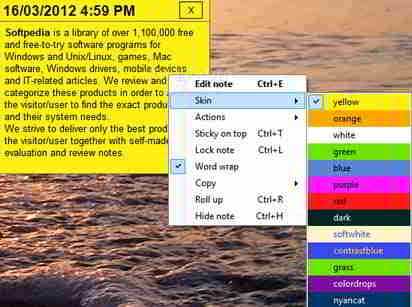
The app sits in the system tray and all of its functions can be accessed from its context menu. Edit mode allows you to format text.
Right-click on the note and you can make it stay on top, set the color, save it as a text file, hide it and you can even send the contents as mail to an e-mail client.
The most useful feature’s of Notefly
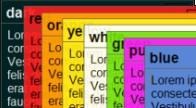
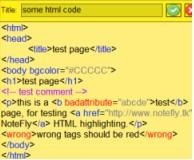
1. Create beautiful notes in the colors you want. 2. Create lists in a note for example your shopping list. Make a thing that is important bold or underlines them just like in an office suit. 3. With the manage notes window you can easily decide which notes to show and which can be removed. 4. If you code, you will love the helping highlighting colors NoteFly can highlight PHP, HTML, and SQL snippets. 5. NoteFly is designed to be lightweight. It’s less than 300 KB to download and doesn’t use the windows registry 6. NoteFly is highly customizable with lots of settings and notefly can be extended with plugins.
The best thing is that its open-source software and completely FREE. Give this desktop sticky notes a try if you want a better app than windows sticky notes.
Opinion : Recommended over windows sticky notes (Much better) For : Easy to use, Note management, Easily customizable. Cons : None. Download for FREE. (Secure and Safe) If you enjoyed this post, Please consider leaving a comment or subscribing to the Feed to have future articles delivered to your Feed reader
Hello! I am Ben Jamir, Founder, and Author of this blog Tipsnfreeware. I blog about computer tips & tricks, share tested free Software’s, Networking, WordPress tips, SEO tips. If you like my post /Tips then please like and share it with your friends.
We use cookies on our website to give you the most relevant experience by remembering your preferences and repeat visits. By clicking “Accept”, you consent to the use of ALL the cookies.
This website uses cookies to improve your experience while you navigate through the website. Out of these cookies, the cookies that are categorized as necessary are stored on your browser as they are as essential for the working of basic functionalities of the website. We also use third-party cookies that help us analyze and understand how you use this website. These cookies will be stored in your browser only with your consent. You also have the option to opt-out of these cookies. But opting out of some of these cookies may have an effect on your browsing experience.
Necessary cookies are absolutely essential for the website to function properly. This category only includes cookies that ensures basic functionalities and security features of the website. These cookies do not store any personal information.